The Cabinet of Keyboard Curiosities
Advent 2026
As far as key placement is concerned, most computer keyboards today look roughly the same. There's Escape and F keys at the top, a Caps Lock key below Tab, and modifier keys on the outer edges of the space bar row. Unless it's some compact model, there's also usually a numpad and set of arrow keys in the "inverted T" configuration. Most of this is based on the layout of IBM's 1985 Model M keyboard, and I suppose nobody dares to stray too far from this standard, since it's what's everyone's gotten used to.
This hasn't always been the case, and there was a time when no two computer brands or keyboard manufacturers agreed on much of anything except the basic alphanumeric layout. I'm not going to pretend this, in particular, was the good old times, because inverted T arrows and an otherwise reasonably standardized layout are very convenient when switching between machines.
Nevertheless, there's been some spectacular keyboards through the ages. It would be impossible to mention all of them, but below is a small, curated selection. All the images can be clicked to view a higher-resolution version.
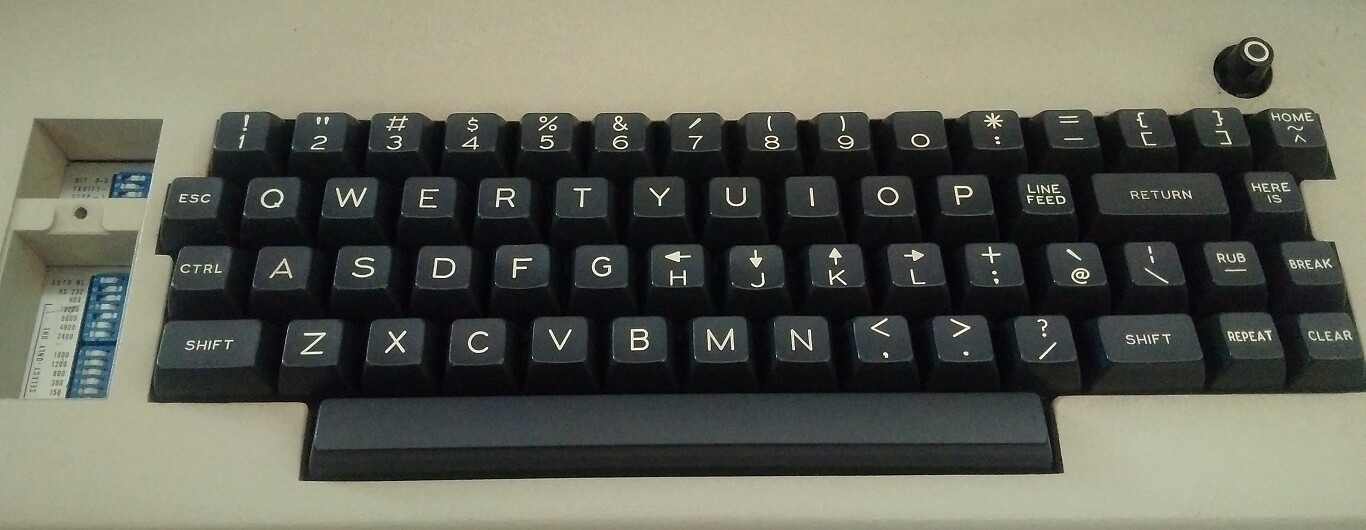
Lear Siegler ADM-3A (1976)
The LSI ADM-3A was an early terminal, and has had an inordinate amount of influence on the world of text editing. This model is, at least according to lore, what Bill Joy used when writing the vi text editor. There are certainly no inverted T arrow keys here, but the H, J, K and L keys are adorned with arrows. These indicate the function of Ctrl+H, Ctrl+J, etc, and correspond to the keys for cursor movement still used in vi, vim, and other derivatives. Also note how Esc is more conveniently placed close to the home row, and that Ctrl is in what some still consider "the correct place", above the left shift key.
Personally, I'm more interested in the "HERE IS" key. It was apparently used to send a sort of handshake to the remote host, so that the mainframe knew the terminal was still connected. More information is available here.
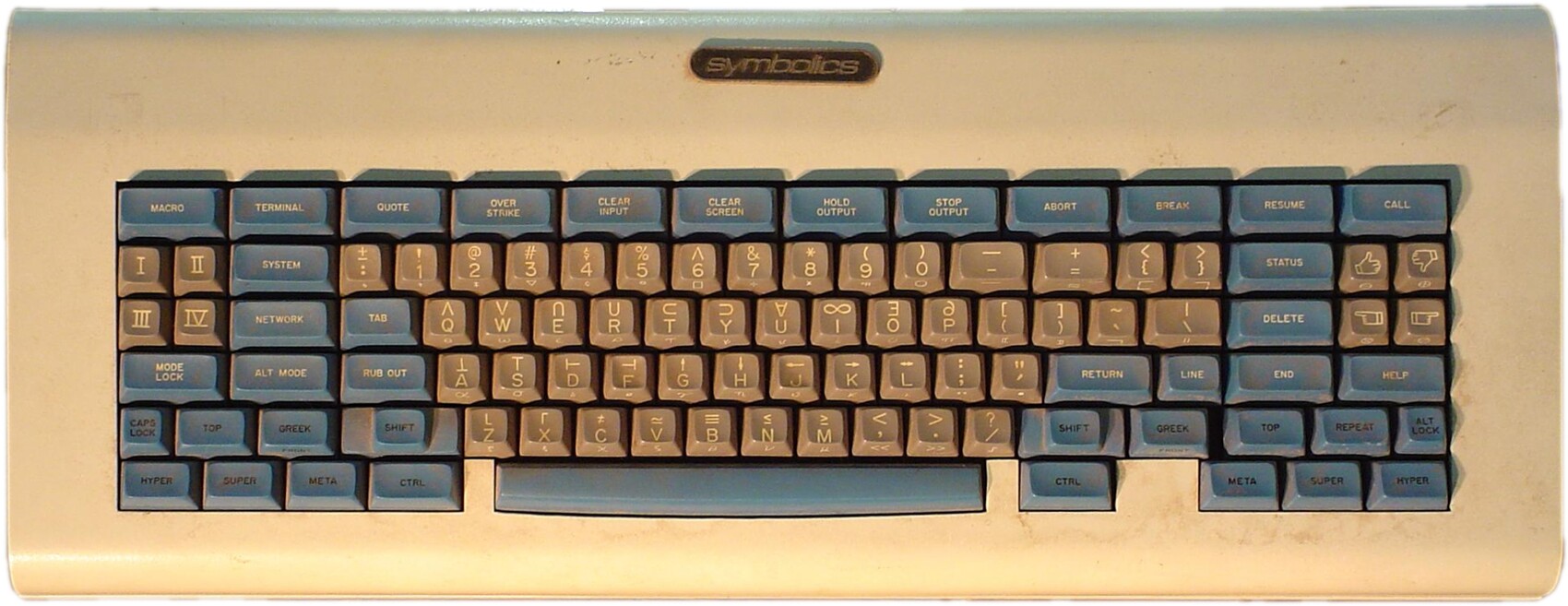
Space-cadet (1978)
Speaking of keyboards that influenced popular text editors, here's the Space-cadet. It was designed for use with Lisp programming on Lisp machines, which were computers built specifically to make Lisp run fast (which, according to some, is still an unsolved problem).
The Space-cadet was influential in the creation of what eventually became the Emacs text editor, and users might recognize the modifier keys called Meta, Hyper and Super. Hardcore fans can buy a modern recreation for a very large sum of money.
(I suppose I should also mention A Programming Language and APL keyboards here, since I don't want to get beat up by a mob of angry array aficionados.)
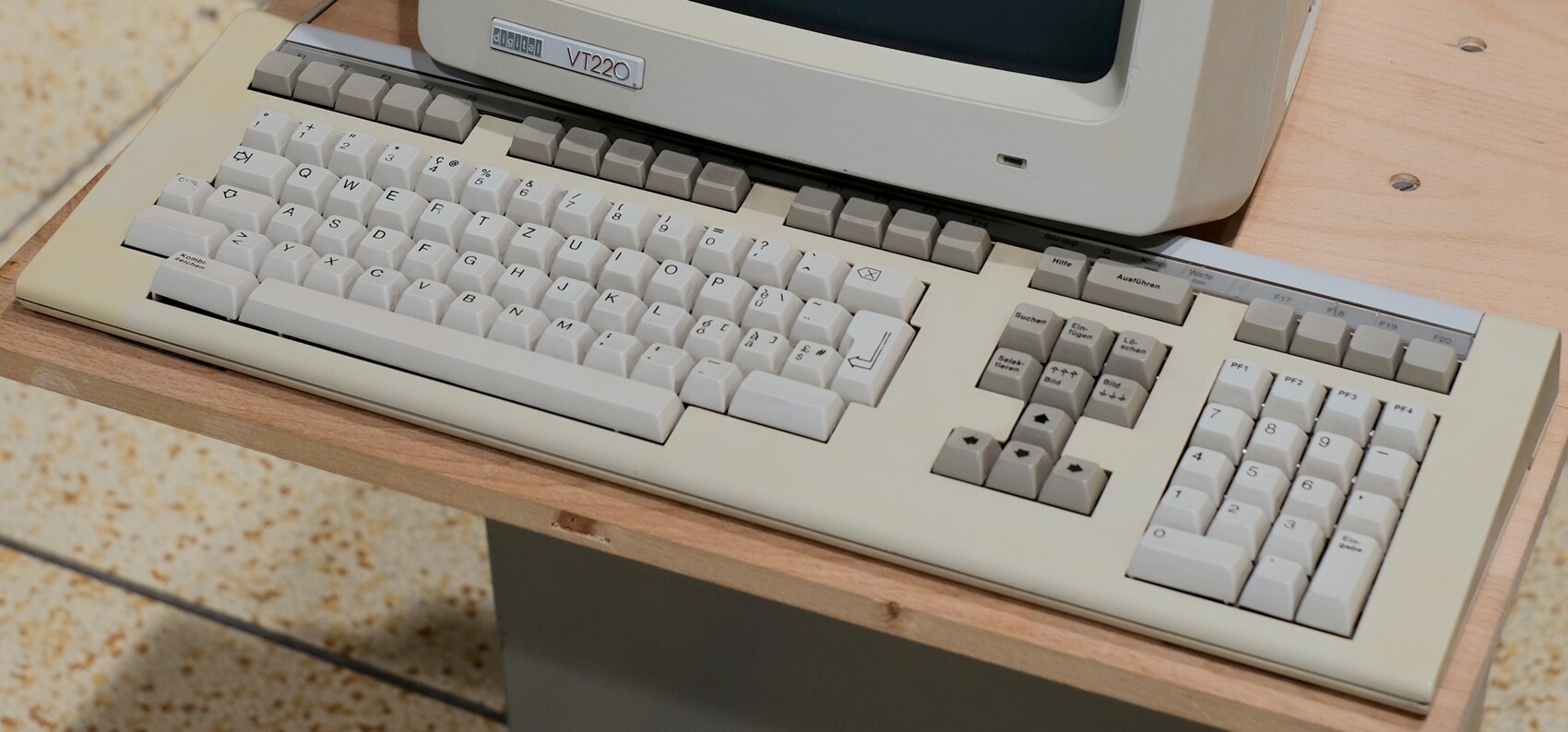
DEC LK201 (1982)
The DEC LK201 was designed for and shipped with DEC's VT220 terminal. At a first glance, it might look like any modern computer keyboard. Several keys are missing, however, and Ctrl is fighting for space (as in room, not the key) next to Caps Lock. The numpad is there, though, and the inverted T arrows. The LK201 wasn't first with the inverted T, but I dare say it helped popularize it. We've not quite arrived at the modern standard layout yet, but we're getting there.
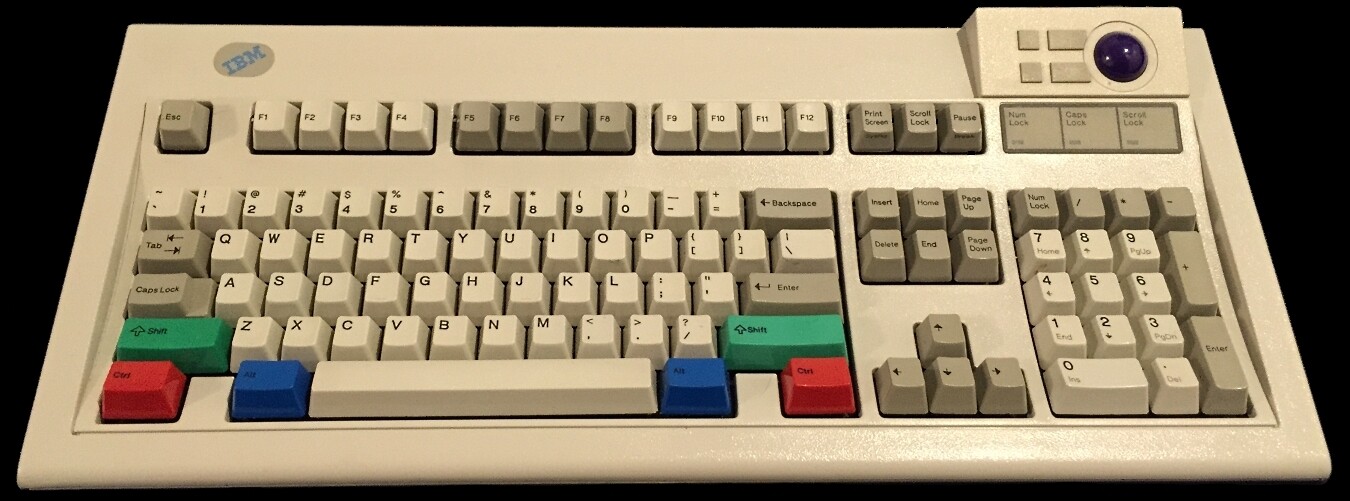
IBM Model M (1985)
Here's the fabled IBM Model M, although in a funky variety with RGB modifier keys and a built-in trackball (this is a cabinet of curiosities, after all). Most modern typists would probably feel right at home here: Apart from the addition of Windows keys, the cheap Logitech keyboard I'm writing this text on has essentially the same layout - including the tall plus key on the numpad and the little gap on the right hand side of the Caps Lock key.
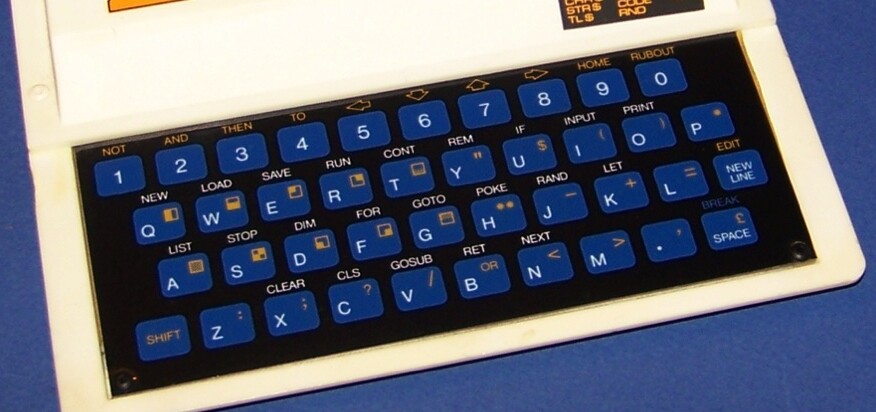
Sinclair ZX80 (1980)
So far, we've looked at expensive keyboards and computer systems intended for professional use. To make computing affordable for the average consumer, many manufacturers cut costs and corners by either 1) building the computer and keyboard into a single unit, 2) skimping on said keyboard, or 3) both of the above. The most glaring example is perhaps the cheap membrane keyboard on the Sinclair ZX80, a machine that sported a whopping 1 KB of RAM and blanked the entire display when a key was pressed.
The engineers probably knew just how bad the keyboard was, because each key also corresponds to a shorthand for a BASIC keyword: Instead of typing GOSUB, the user can just press V. Since it was mostly used for simple BASIC programming anyway, this made matters slightly better.
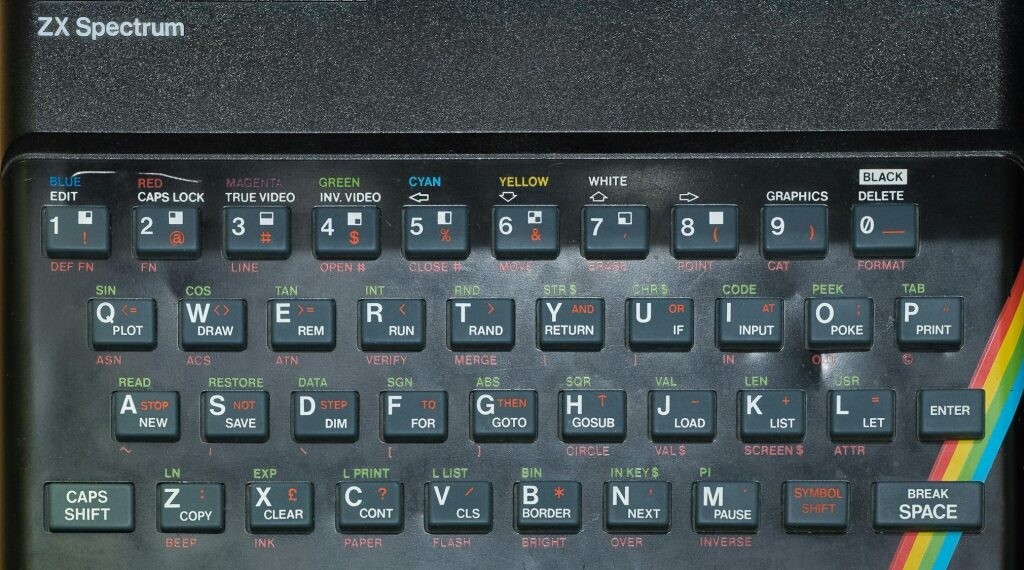
Sinclair ZX Spectrum (1982)
The Speccy is no doubt one of the most beloved home 8-bit home computers. It was cheap, it was cheerful, and true to Sinclair form, it had an abysmal keyboard. The cheap rubber keys, in the style of a pocket calculator, were certainly a step up from the membrane affair of the ZX80, but still not exactly a dream come true for touch typists. Like its predecessor, it features BASIC keyword shorthands, and a completely bizarre placement of the space "bar".
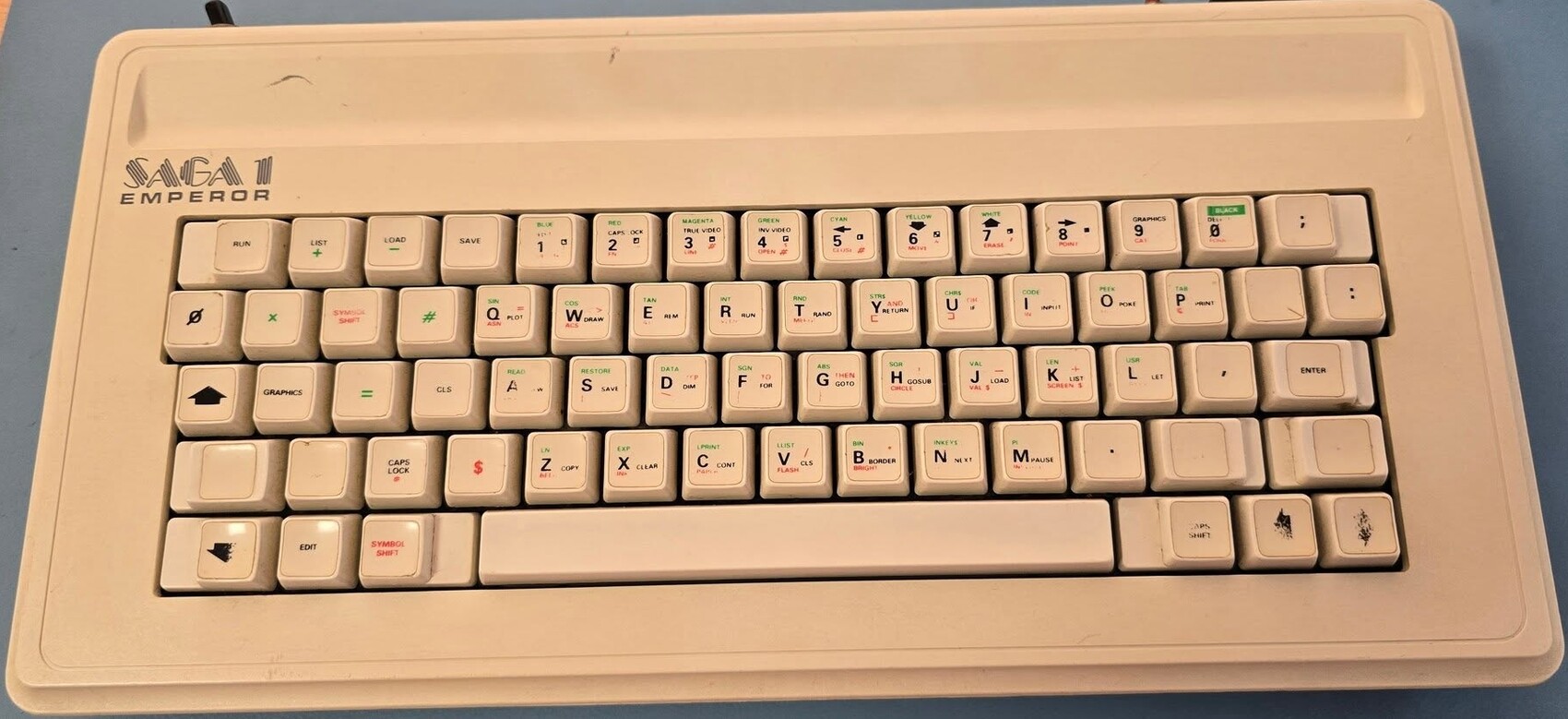
SAGA 1 Emperor (1984)
Since the ZX Spectrum was a popular computer with an unpopular keyboard, replacement hardware soon emerged. The SAGA 1 Emperor was one such offering, which clamped on top of the Spectrum's motherboard. Even further assembly was required: the key legends came on a sticker sheet, and the user had to apply them to the keycaps.
I've used an Emperor 1 a few times, mostly for playing Jetpac. The 1980s was a long time ago, but as I remember it, it was a fairly creaky and uncomfortable construction. Still, it was miles better than what it replaced.
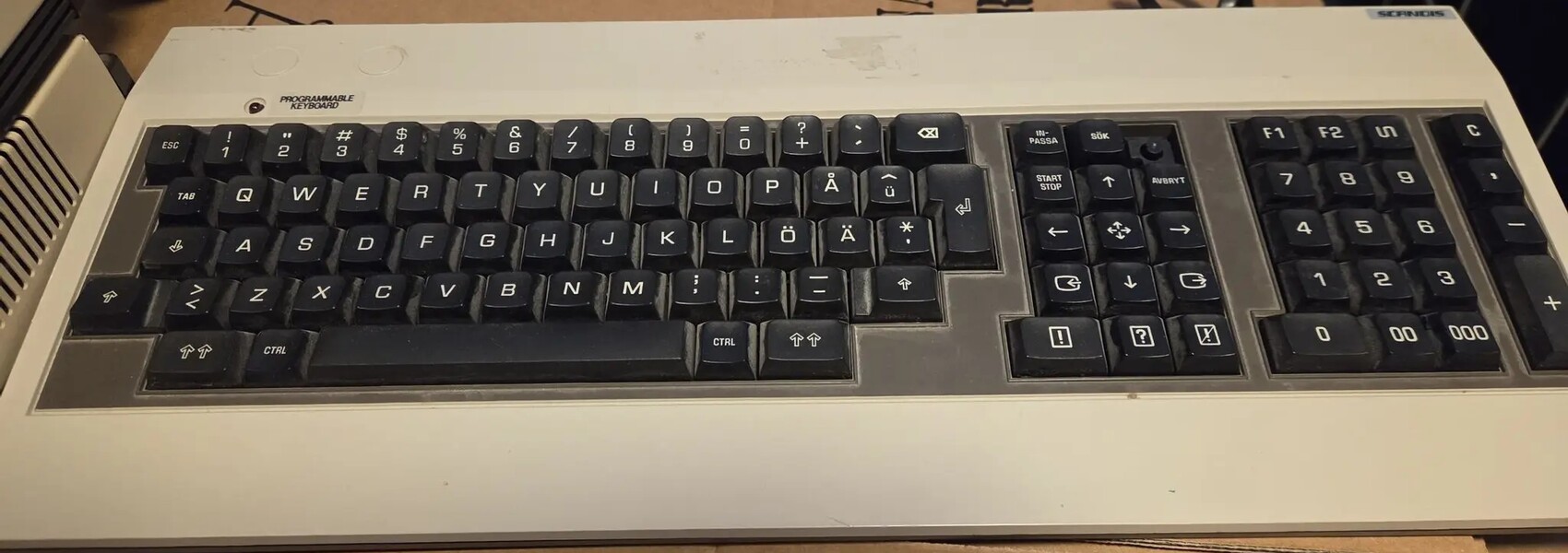
Telenova COMPIS (1984)
COMPIS stands for COMPuter In School, and is indeed a computer specifically designed and manufactured for the Swedish school system. Despite kompis meaning mate (or buddy in the US), the computer itself was a fairly unfriendly concoction that ran CP/M-86 on an 80186 and came with a monochrome green screen - but it does have a spectacularly odd keyboard! I suppose the brown and beige aesthetic might feel retro-funky to some people these days. Personally, just I'm brought back to the stale air and annoyingly positive motivational posters of a school nurse waiting room, on a gloomy winter Tuesday, in a Sweden long lost in time.
Astute readers might notice that a single key is missing from the particular keyboard depicted above. Coincidence? I think not!
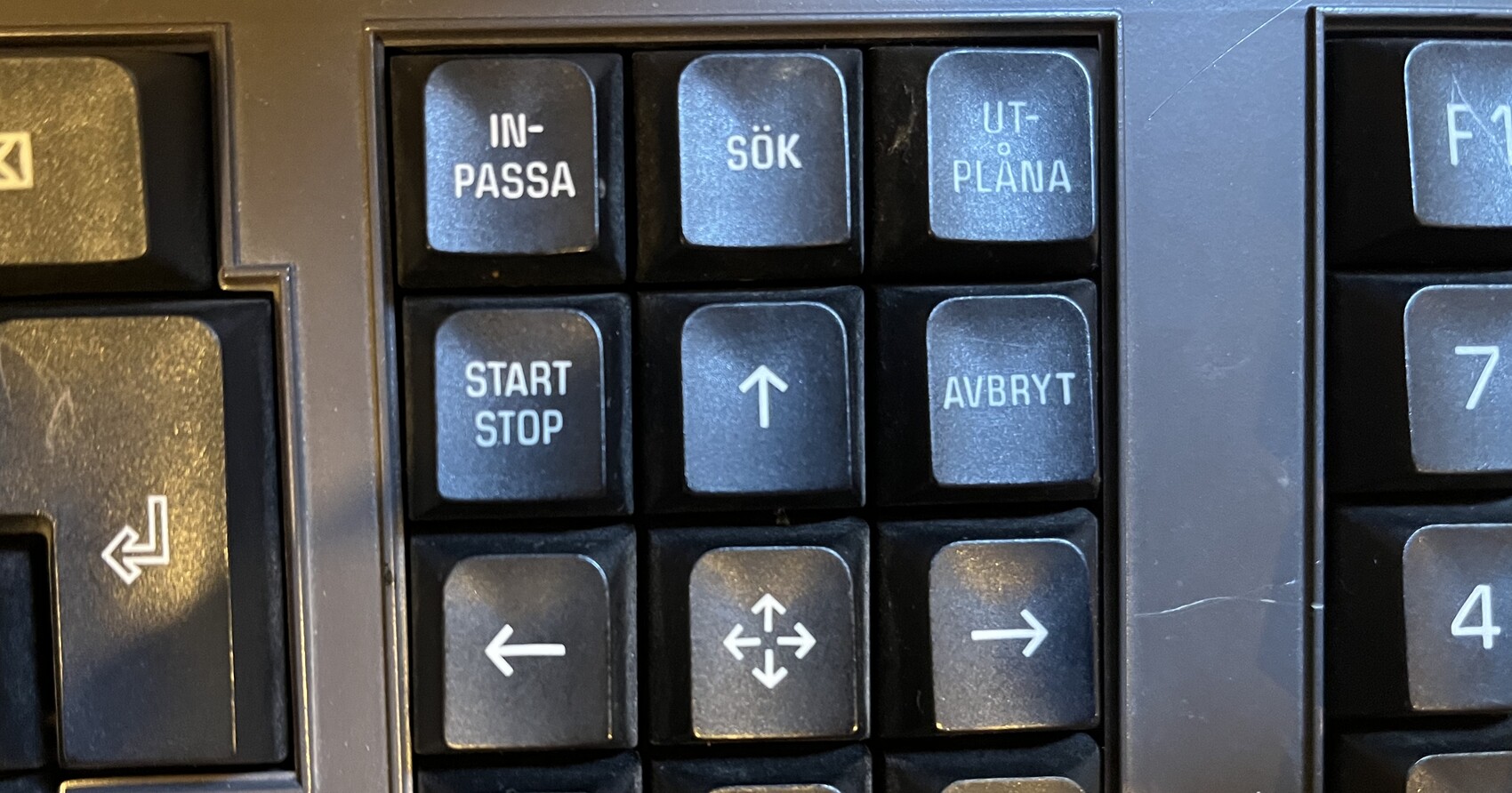
The one key that's gone AWOL is of course UTPLÅNA - OBLITERATE in English. Who wouldn't want to steal that? The other keys depicted here, apart from START STOP, are INPASSA (Insert), SÖK (Search) and AVBRYT (Abort).
I'm old enough to have used COMPIS in a touch typing class in grade school (I did not, in fact, learn touch typing), but regrettably I don't remember what UTPLÅNA or any of the other peculiar keys were actually used for. It's probably something boring, like a bad translation of Delete.
Alas, I can't even remember if the keyboard was decent to type on. I'm sure it was a sturdy, efficient, government-approved piece of quality hardware, unlike the flimsy, glossy iPads used in education today.
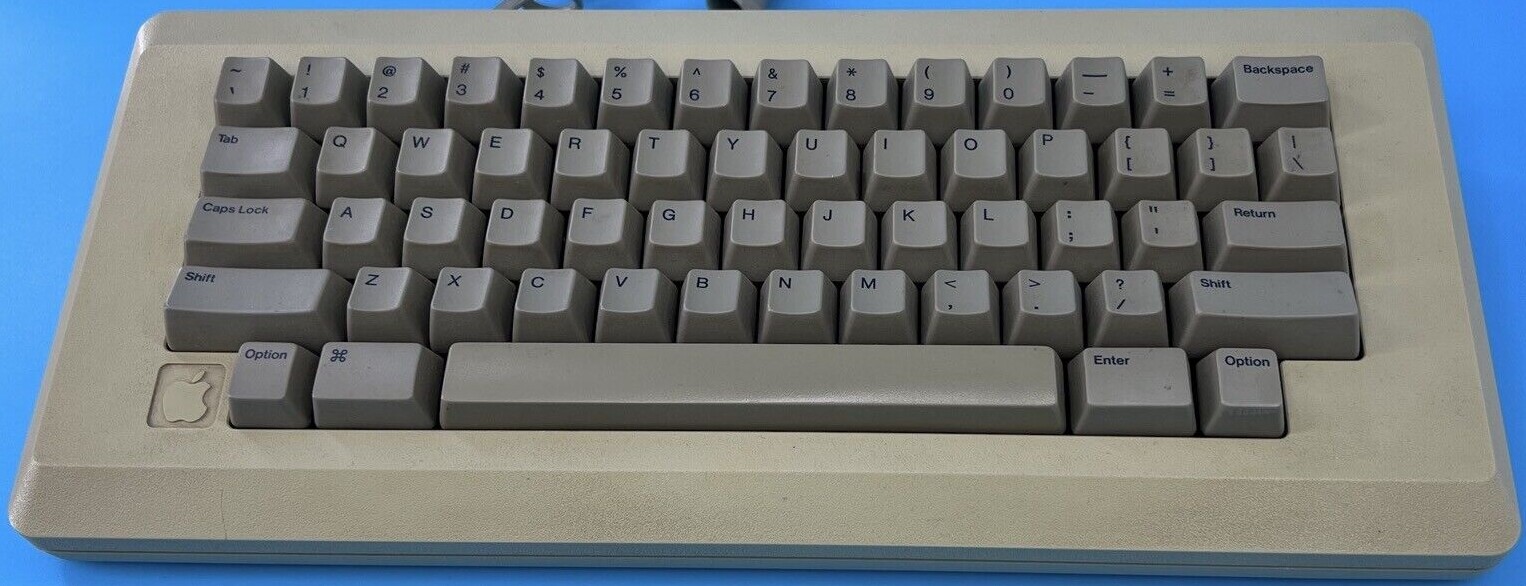
Macintosh 128k (1984)
The first Mac keyboard was a minimalist affair: No function keys, no numpad, nothing. Unlike the Apple IIc and Apple IIgs, but exactly like the Apple Lisa, the Mac has no arrow keys at all - because who needs arrows when you've got a mouse?
Everybody, that's who, so those were added on later models.
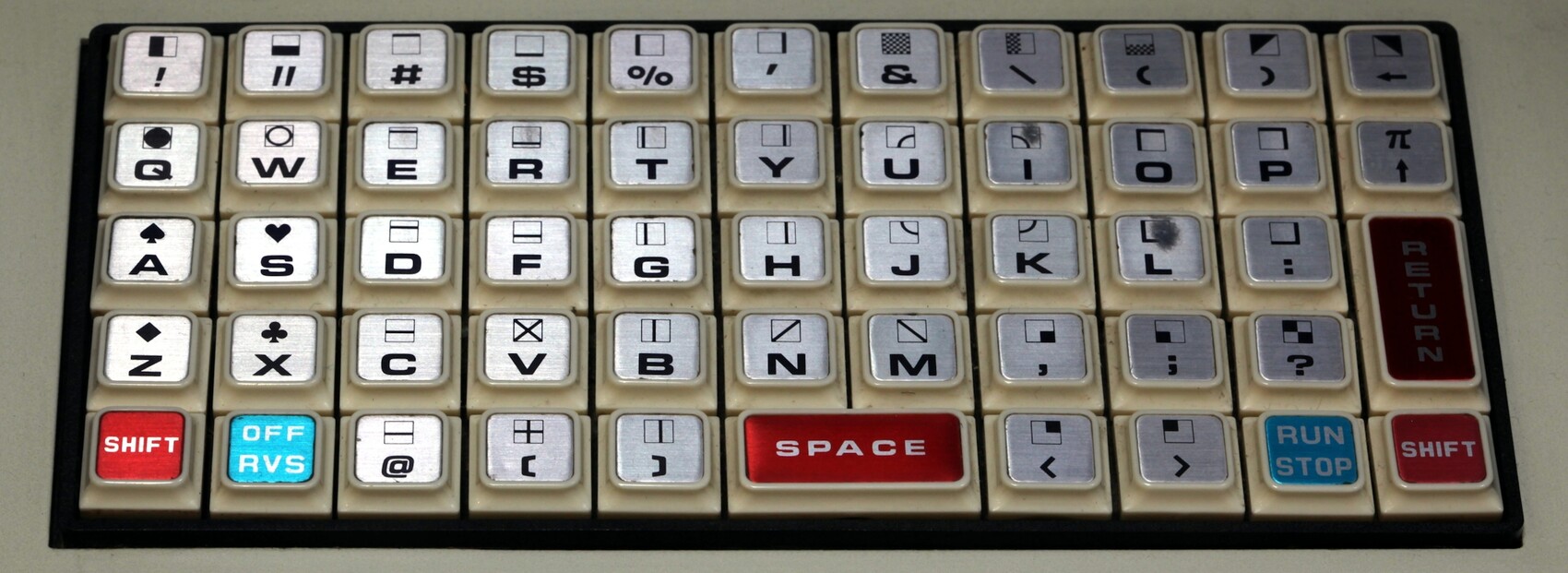
Photo © Rama, Cc-by-sa-2.0-fr
Commodore PET 2001 (1977)
When Commodore pivoted to computers, they were already in the business of manufacturing electronic calculators and filing cabinets. Hence, the PET 2001 keyboard combines these two products into a tour de force of unprecedented typing comfort.
The character graphics on the key legends are known as PETSCII, and followed along to both the VIC-20 and the immensely popular C64. Luckily, both of those machines were equipped with much better keyboards.
Atari ST (1985)
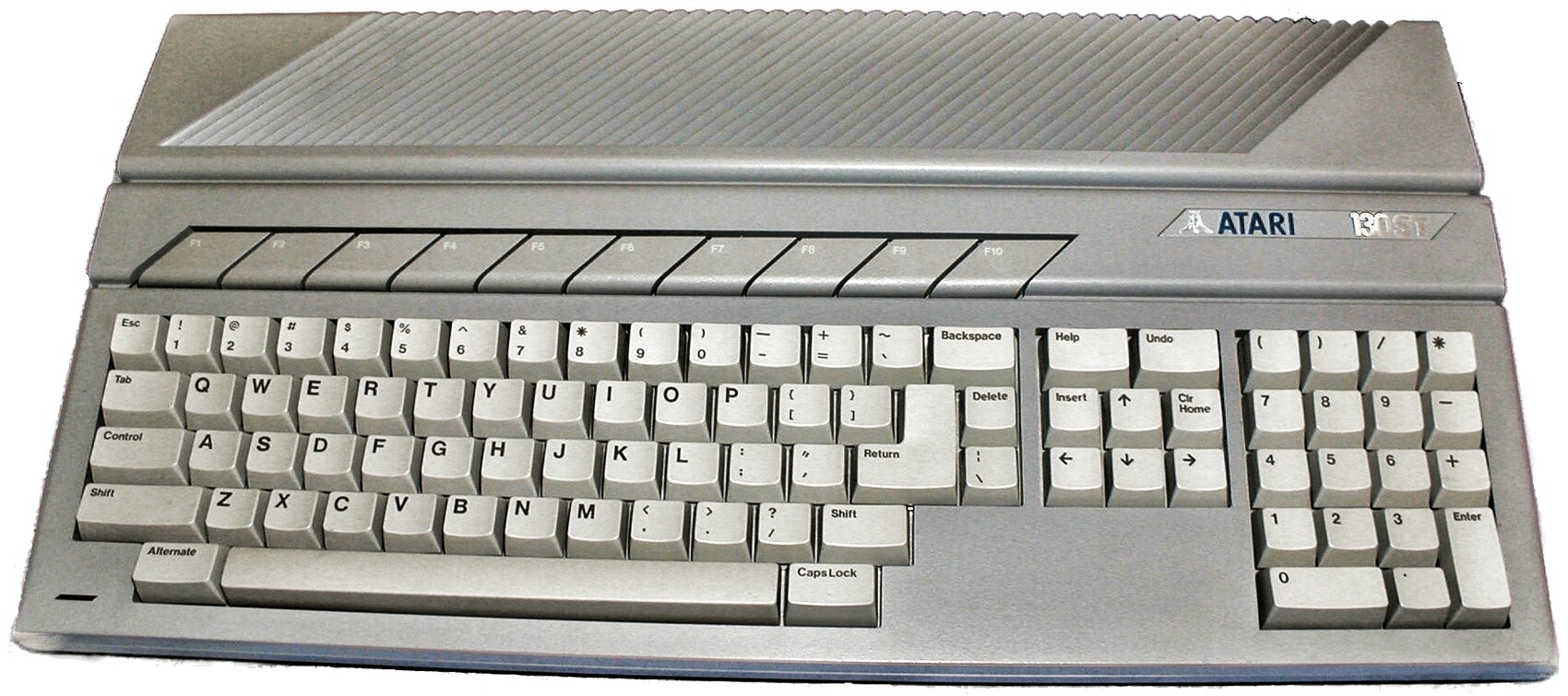
The Atari ST line of computers is instantly recognizable by their slanted F keys, which admittedly look rather cool. The keyboard itself feels terribly mushy, and I personally don't enjoy typing on it at all.
Layout-wise, the Model M era is starting to manifest, but there are some curious outliers to the right of the Return key, and Caps Lock has a particularly unique placement. The model depicted above is a never-released 130ST prototype, but the same layout was kept throughout Atari's ST line and its successors, up to and including their last computer, the Falcon 030 released in 1992.
Commodore Amiga 1000 (1985)
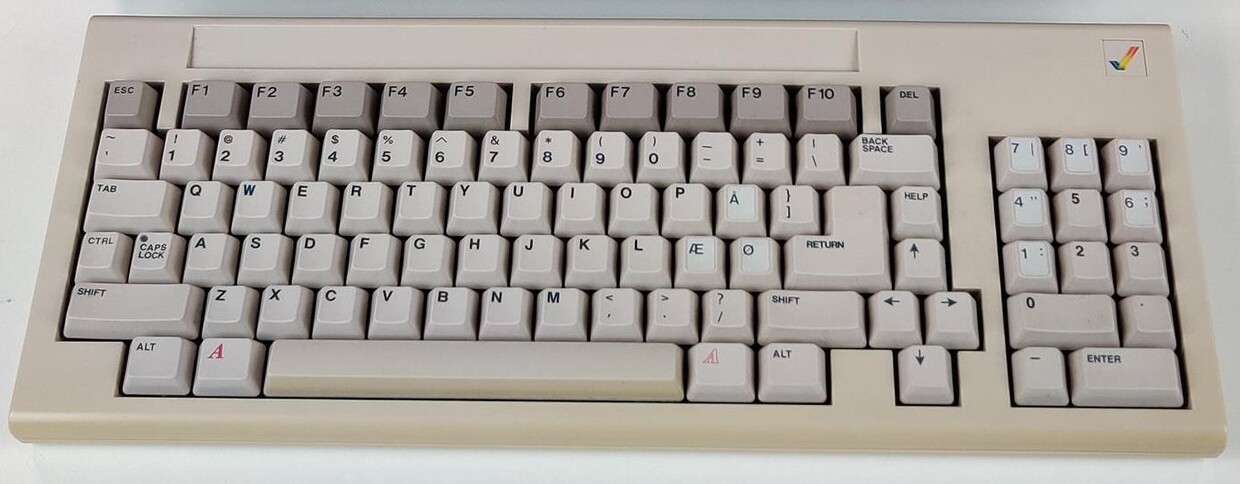
The A1000 is the only Amiga model not to have the "inverted T" arrows. The clever compromise between Ctrl and Caps Lock was however kept on later models, although the numpad was changed into something more recognizable to modern users. The Caps Lock indicator LED is placed inside the actual Caps Lock button button, a concept that was also kept on all subsequent models. This LED placement wasn't unique to the Amiga: among others, some Sun keyboards also have this feature.
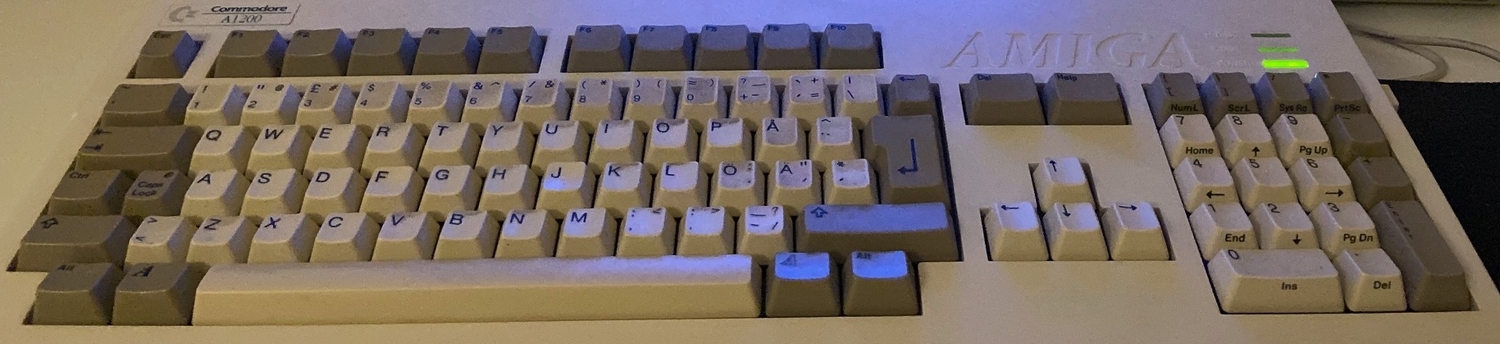
As can be seen on one of my Amigas above, all later Amiga models (from the 500 through to the 4000) had a layout more reminiscent of the Model M. This is the default keyboard for me, because it's what I grew up with. Consequently, I think it offers a great typing experience. Others might disagree, but the important thing is that it's better than the Atari ST's mush.
Amstrad CPC 472 (1984)
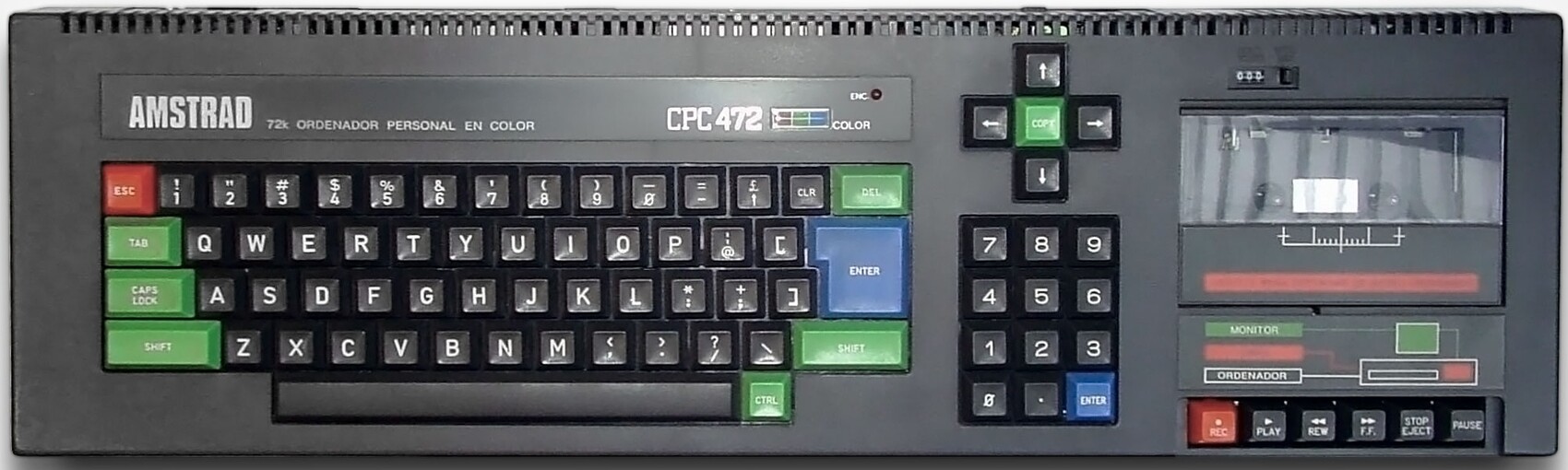
The Amstrad CPC line of of home computers came in a wide variety of models, all of them with interesting designs. The 472 depicted above is a modified version of the 464, created to circumvent Spanish import tariffs. I've always liked this look, with RGB colours on black and a built-in cassette player. The layout seems fairly reasonable, except for the rather lengthy distance between the home row and the arrow keys.
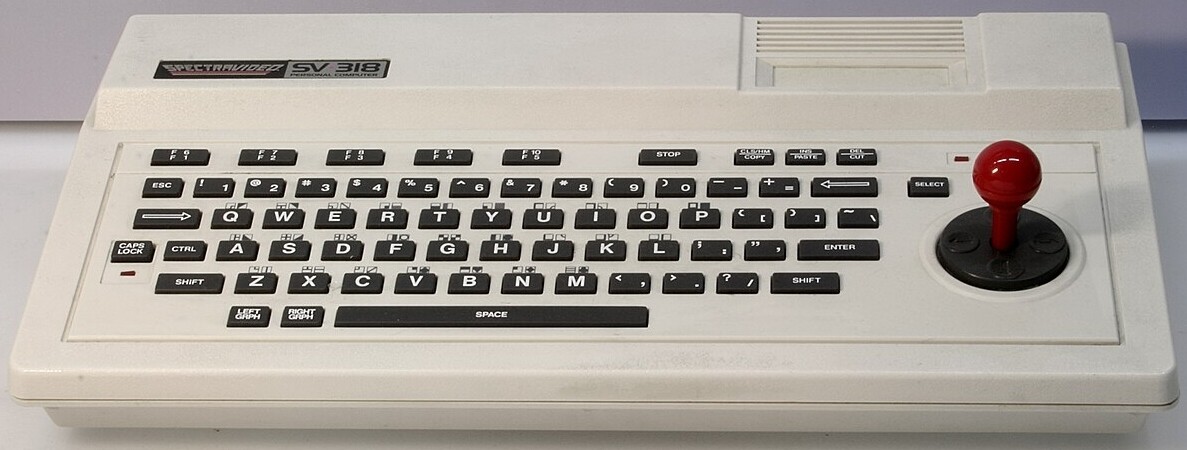
Photo © Igor Clukas, CC BY 2.5
Spectravideo SV-318 (1983)
Spectravideo released a whole range of 8-bit home computers. This one probably has the worst keyboard of the lot, but on the other hand, it's got a built-in joystick in lieu of arrow keys. I'm not sure if I'd find it fun or tedious to use a joystick for text editing, but I'd be willing to give it a go.
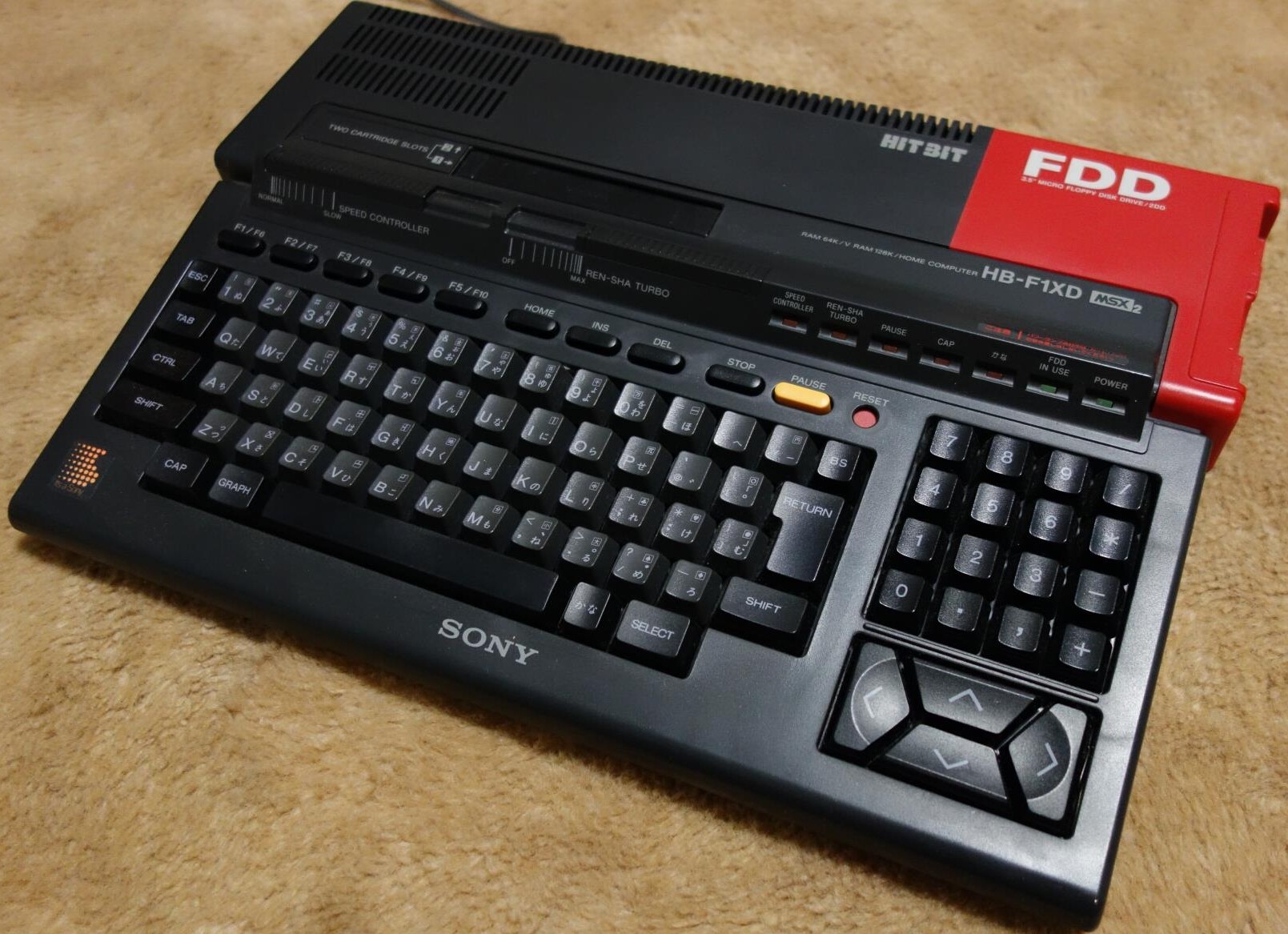
Sony HitBit F1XD (1987)
When it comes to futuristic computer designs, Japanese MSX machines are the best of the bunch. Look at all those LEDs and curious buttons! Look at the arrow keys, clearly designed with gaming in mind! Look at that cool splash of red on the floppy drive! LOOK, DAMNIT!
Apparently the sliders - Speed Controller and Ren-Sha Turbo - are useful in games, since they provide slow motion and autofire functions, respectively.
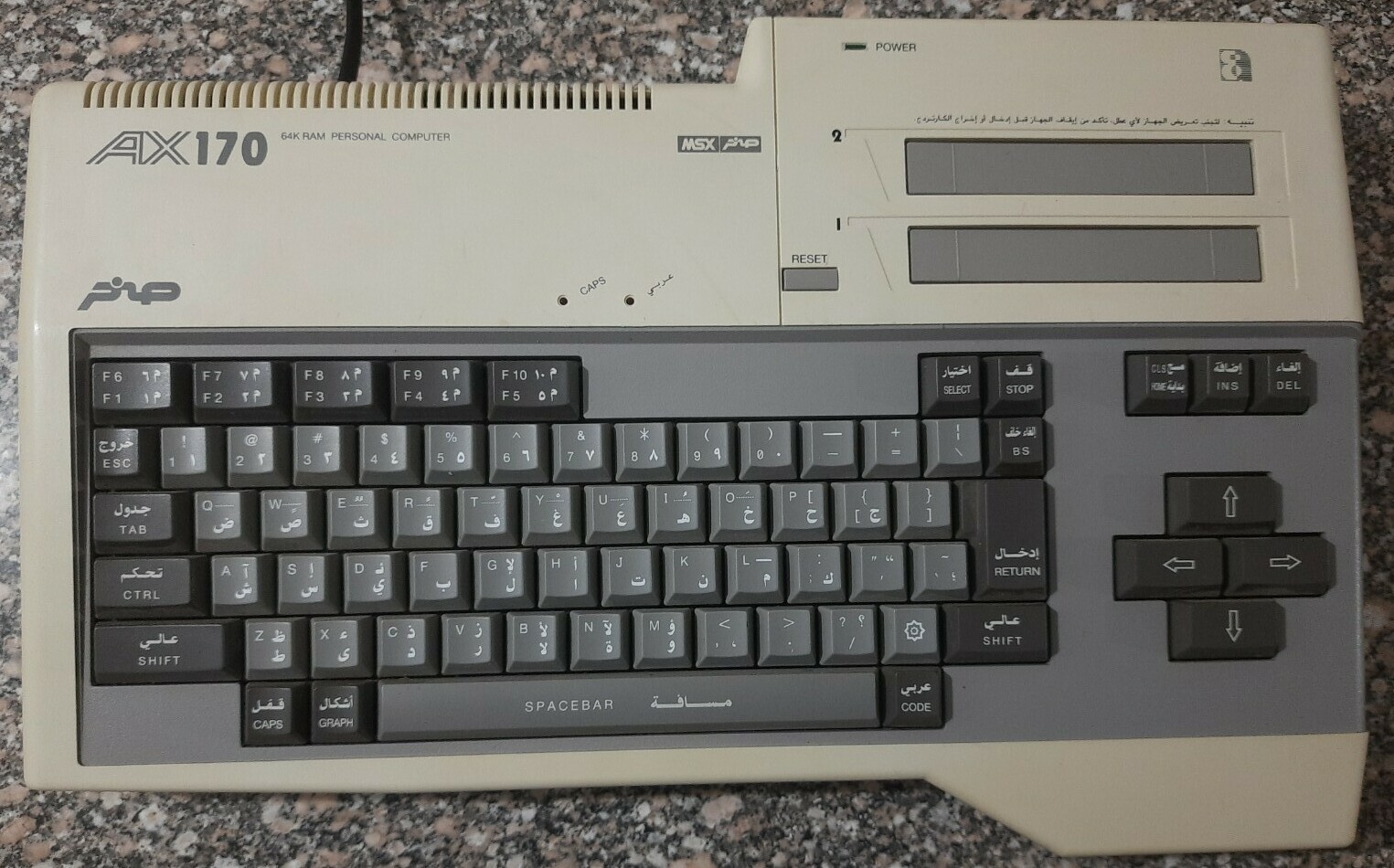
Al-Amiah Sakhr AX-170 (1986)
Al-Amiah was a Kuwaiti company importing MSX computers for resale on the Arabic market. This particular model was originally manufactured by Sanyo. Not quite as decked-out as the Sony F1XD, this design is still something out of the ordinary (and it's not cheating, because the the computer is the keyboard, and I decide the rules on my own website!). I can see Sony's HitBit above being used by some cyberpunk hero like Case in Neuromancer, whereas this slightly more corporate aesthetic would probably have been preferred by the Yakuza.
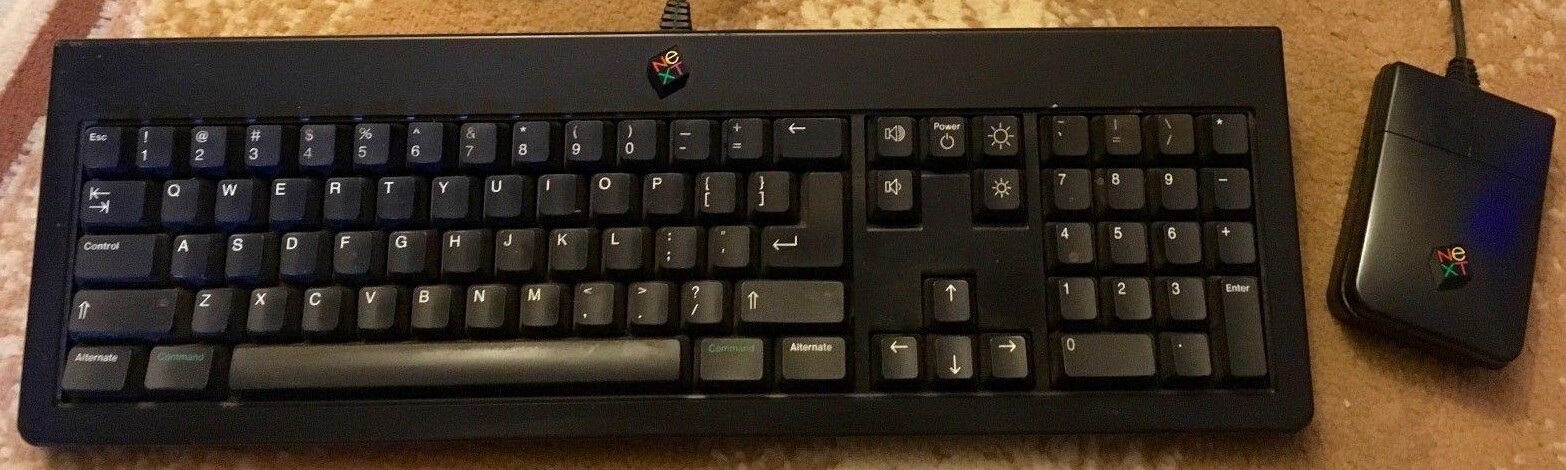
NeXT Cube (1990)
NeXT is what Steve Jobs did after he'd been ousted from Apple in the 1980s. Although never very successful, both the hardware and OS were extremely good-looking and rather pleasant to use. The keyboard layout is a fairly standard affair, with the exception of specific keys for controlling power, volume and screen brightness. It's not visible in the picture, but the mouse is supposed to be plugged into the back of the keyboard.
Typing-wise, I don't recall this keyboard being anything out of the ordinary: just a forgettable, decent, non-controversial experience.
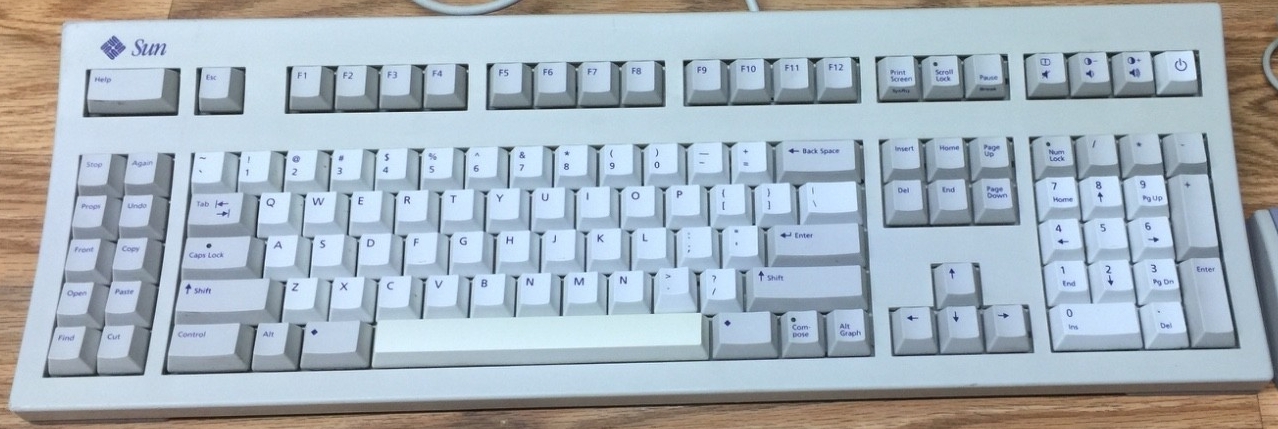
Sun SPARCStation 5 (1994)
Sun Microsystems produced an impressive variety of workstations, and probably almost as many keyboard models. This particular one is for the SPARCStation 5/10/20 range and like the NeXT keyboard above, it's got special keys for power, brightness and volume. Like the Amiga, it's got keys with internal LEDs, including Caps Lock. Most notable is perhaps the set of Sun-specific functions keys along the left edge, for Cut, Paste, Copy, Find, Undo and more. To my knowledge, Sun kept these special keys and dutifully manufactured their own keyboards even for their last SPARC workstation, the Ultra 45 released in 2007.
I've always liked the overall aesthetic of Sun's mid-90s workstations, including the typography on the key legends. Their default CDE desktop config used the same font, carrying the design through the entire product. My recollection of these SPARCStation keyboards is that they were fairly mushy, but not unpleasantly so.
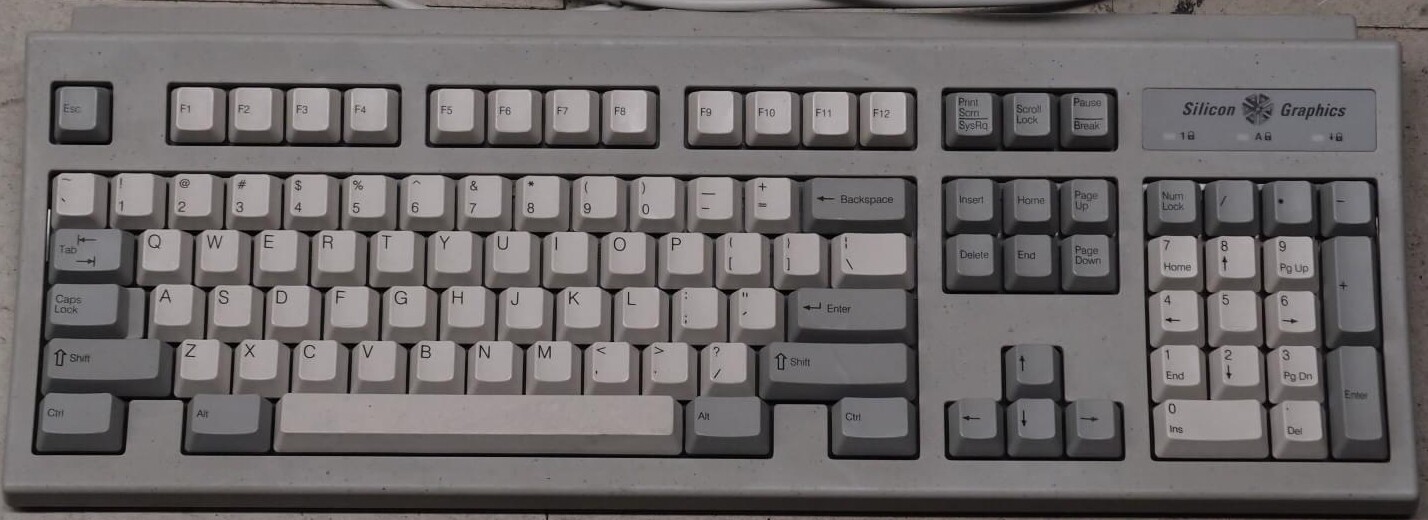
SGI Indy (1993)
Apart from the speckled "granite" case and the SGI logo, this keyboard is indistinguishable from a bog standard, early 1990s PC keyboard: it's even got a completely normal PS/2 connector. This is what you'd get if you walked into Jeff's Computer Parts in 1993 and asked for a typing device for your new 486 back at the office. And, apparently, it's also what you got when buying a $10,000 UNIX workstation from one of the then hottest companies in Silicon Valley.
For shame, SGI! This is supposed to be a cabinet of curiosities, not some branch office of Ernst and Young! Listen unc, you're lowkey NGMI if you keep this up, no cap.
With that, I'm out. Until next time, take care and happy hacking!
Some of the photos on this page are taken by me. The rest are from around the net, and I've attributed the ones that were attributable.